3D traffic visualization
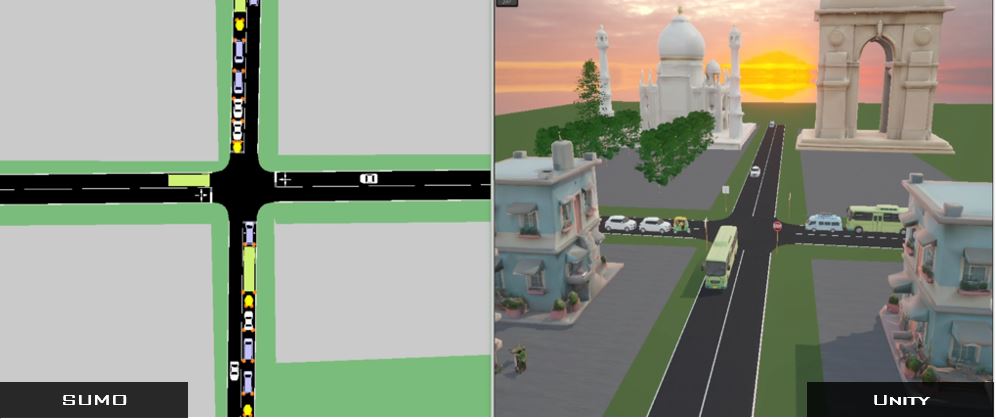
Translate a SUMO road network into a Unity scene with roads, vehicles, buildings, trees, and traffic signals.
Open source · SUMO ↔ Unity
SUMO2Unity connects traffic behaviour from Eclipse SUMO with an interactive Unity environment—giving researchers a practical foundation for 3D visualization, driver simulation, and human-in-the-loop road-safety studies.
The workflow
SUMO continues to model vehicle movement and traffic rules. Unity turns the same traffic into an interactive 3D environment where a participant can observe—or join—the simulation.
Build the road network, traffic demand, signals, car-following behaviour, and lane-changing logic.
Synchronize vehicle coordinates and signal timing between the two environments at each simulation step.
Visualize the network in 3D or connect a driver, bicycle, scooter, or VR participant to the traffic scene.
What it enables
Use one connected workflow to preserve realistic traffic interactions while investigating what a person sees, decides, and does inside the simulated environment.
Watch the one-minute demoTranslate a SUMO road network into a Unity scene with roads, vehicles, buildings, trees, and traffic signals.
Place a participant in a driver, bicycle, scooter, or virtual-reality simulator surrounded by SUMO-generated traffic.
Study road-user behaviour across traffic conditions while retaining car-following, lane-changing, and signal-control logic.
Combine a controllable traffic model with an immersive interface for demonstrations, education, and scenario assessment.
Start here
The current project guidance uses SUMO 1.22 and Unity Editor 6000.0.53f1. Follow the three guides in order, then open the downloaded project in Unity Hub.
Install Eclipse SUMO and configure the required Windows environment variables.
Follow the RoadwayVR SUMO guide →Install Unity Hub, the recommended editor version, Visual Studio, and its Unity dependencies.
Watch the Unity preparation guide ↗Download the project, extract it, add it in Unity Hub, and follow the setup video.
Download the latest release ↗Research foundation
The open-source implementation is accompanied by peer-reviewed work describing the original co-simulation tool and its extended virtual-reality traffic-safety application.
A. Mohammadi, P. Y. Park, M. Nourinejad, M. S. B. Cherakkatil, and H. S. Park
View paper by DOIA. Mohammadi, M. S. B. Cherakkatil, P. Y. Park, M. Nourinejad, and A. Asgary
Read the open-access articleCommon questions
Technical problems and feature requests belong in the GitHub issue tracker, where they remain visible to the project community.
Ask on GitHubSUMO2Unity is an open-source traffic co-simulation project that connects Eclipse SUMO with Unity. SUMO supplies traffic behaviour and signal states while Unity provides the 3D or virtual-reality environment.
Typical applications include 3D traffic visualization, driver and cyclist simulator studies, VR experiments, human-in-the-loop simulation, traffic-safety assessment, and digital twins.
Yes. The project code is distributed under the MIT License. Included assets are distributed under a Creative Commons Attribution license; review the repository for the current licensing details.
The current repository documentation says pedestrians are not included. Check the latest release notes and issues for project updates.
Ready to explore the project?